
The third button with letter M is the manual focus mode. The focus range is adjusted with the wheel (1). In manual focus mode, it is possible to "stretch" the wheel by double-tapping a certain area on the screen. You can read more about this function in section 2.8. Zooming in on the subject with a double tap.
Long tap the manual focus button activates the infinity focus mode. This mode is activated by changing the button icon to the Latin letter M with the infinity symbol in the upper right corner.
The picture on the left shows the following controls: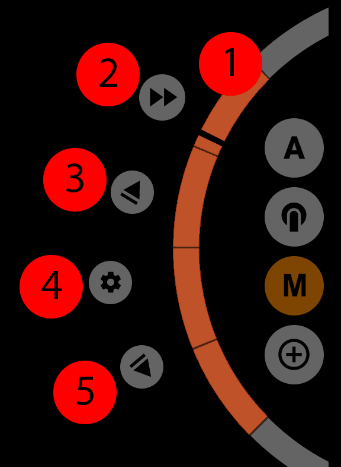
1 - Control wheel; 2 - Simultaneous automated focus and zoom start button; 3 - Automated focus-out button; 4 - Focus settings menu button; 5 - Automated focus-in button.
1.2.3.1. Control wheel
Directions of the wheel-regulator (1): up - far, down - close.
1.2.3.2. Simultaneous start button for focus and zoom
The simultaneous start button (2) is used to start the automated focus and automated zoom at the same time. Pressing it again stops the movement. Since the button has no direction, the direction of movement of each regulator is chosen according to the greater remaining distance. If the regulator has more distance to go up, the regulator will go up, otherwise it will go down. That is, you may get a situation where, for example, the focus goes far away and the zoom regulator moves down. Therefore, it is important to keep an eye on where the focus and zoom regulator positions are before simultaneous start.
1.2.3.3. Button for automated focusing to the far side and setting the upper limit of the control wheel
The automated focus up button (3) is used to start the automatic upward movement of the manual focus control wheel. The first tap starts the movement, a second tap stops the movement.
Long tap this button reassign the upper limit of the manual (and automated) focus control. The focus will not go beyond this limit. In this case, the control wheel does not visually change in any way, but the upper limit now has a new value. So, the new stroke of the wheel extends over the entire orange area. Repeated long tap resets the upper limit.
1.2.3.4. Focus settings menu button
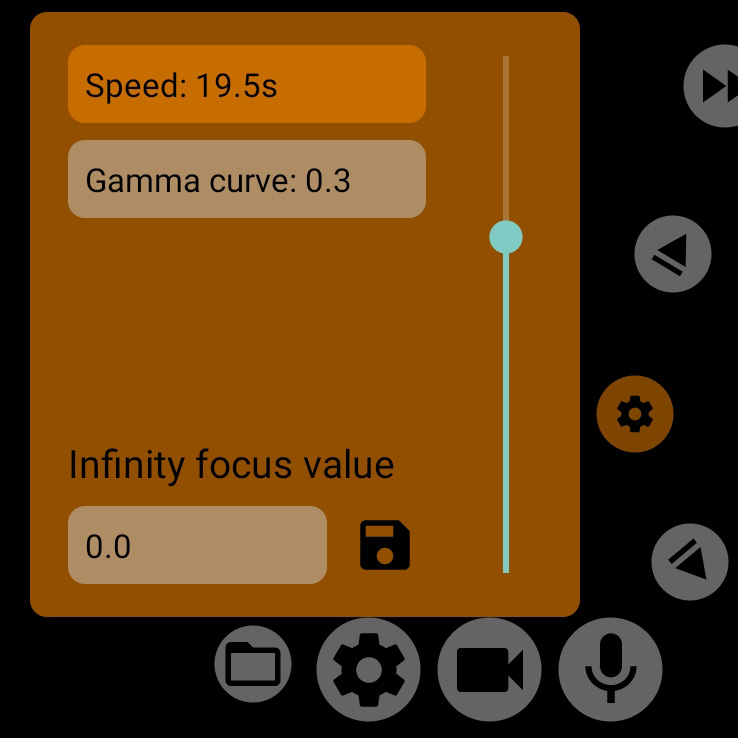
The focus settings menu button (4) brings up a menu with currently only two items: speed and gamma curve. In the infinity focus mode, the infinity focus value block is added to them.
| Speed is the time it takes the focus slider to travel from the lower limit to the upper limit (or back) when you tap the auto-focus buttons (3) and (5). The speed does not take into account the present position of the control, always calculated with the entire gap in mind. The gamma curve allows you to distort the speed of the focus movement slightly. A value of 1.0 performs a linear focus movement, i.e. the focus speed is the same as the speed of the control wheel (1). Values below 1.0 speed up the focus speed at close range and slow down the focus speed at far range. Values like this are a great help when you want to focus more accurately far away because they stretch the top of the adjuster-ring stroke. Values above 1.0, on the other hand, slow down close focusing and speed up far focusing. Adjusting the gamma curve applies to both automated focus and manual focus control. The infinity focus value block only appears when the manual focus mode is activated in infinity focus mode. See section 1.2.3.6. for more information on the infinity focus mode. |
1.2.3.5. Button for automated focusing to the close side and setting the lower limit of the control wheel
The automated focus down button (5) is used to start the automatic downward movement of the manual focus control wheel. The first tap starts the movement, a second tap stops the movement.
Long tap this button reassign the lower limit of the manual (and automated) focus control. The focus will not go beyond this limit. In this case, the wheel control does not visually change in any way, but the lower limit now has a new value. So the new stroke of the wheel extends over the entire orange area. Repeated long tap resets the lower limit.